Full Parameter List
Apply the following parameters in Mission Planner to enable OSCP IMU Product support and establish communication between the flight controller and IMU product.
Important
Ensure the SERIALx_* parameters correspond to the UART port connected to the OSCP IMU via InertialGate, MicroGate, or a custom USB adapter. Replace x with the appropriate serial port number (e.g., SERIAL1, SERIAL2, SERIAL3).
OSCP ExternalAHRS Setup
Ensure EAHRS_TYPE = 15 is set to enable the OSCP IMU External AHRS backend.
Full Parameter List
Set the following parameters in Mission Planner to enable OSCP IMU support and establish proper communication with the external sensor.
| Parameter | Value | Comment |
|---|---|---|
AHRS_ORIENTATION |
12 | Board Rotation |
ARMING_SKIPCHK |
1048062 | Skip Arming Checks |
COMPASS_EXTERNAL |
2 | External compass |
COMPASS_USE1 |
1 | Enable Primary Compass |
COMPASS_USE2, COMPASS_USE3, etc. |
0 | Disable Additional Compasses |
EAHRS_RATE |
500 | External AHRS Rate |
EAHRS_SENSORS |
10 | Sensor Mask |
EAHRS_TYPE |
15 | OSCP IMU |
EK3_IMU_MASK |
1 | Primary IMU |
INS_ENABLE_MASK |
1 | Enable Primary IMU |
INS_USE |
1 | Use Primary IMU |
INS_USE2, INS_USE3, etc. |
0 | Disable Additional IMUs |
SERIALx_BAUD |
921 | 921600 Baud |
SERIALx_OPTIONS |
0 | Default Options |
SERIALx_PROTOCOL |
36 | OSCP Protocol |
Parameter Details
ArduPilot Parameter Reference
The parameters listed below are specific to OSCP IMU integration. For a complete list of all ArduPilot parameters, refer to the official ArduPilot parameter documentation.
AHRS_ORIENTATION — Board Rotation
Sets the orientation of the OSCP IMU Product. Value 12 corresponds to a specific board rotation (PITCH180).
ARMING_SKIPCHK — Skip Arming Checks
Skips arming checks during development. Value 1048062 bypasses ALL pre-arm checks.
Arming Skip Check
Please use with caution and only for testing purposes. Disable with 0 once back to normal operation.
COMPASS_EXTERNAL — External Compass
Enables external compass support. Value 2 indicates the compass is external to the flight controller.
COMPASS_USE1 — Enable Primary Compass
Enables the OSCP compass (compass 1).
COMPASS_USE2, COMPASS_USE3, etc. — Disable Additional Compasses
Disables all other compasses (2, 3, etc.) to avoid conflicts with the OSCP IMU compass.
EAHRS_RATE — External AHRS Rate
Sets the request rate for the external AHRS system. 500 Hz provides fast sensor fusion and responsive flight characteristics.
EAHRS_SENSORS — Sensor Mask
Enables specific sensors for the external AHRS. Value 10 enables IMU and Barometer integration.
EAHRS_TYPE — OSCP IMU
Selects the external AHRS backend. Value 15 is the OSCP IMU driver.
EK3_IMU_MASK — Primary IMU
Specifies which IMU the EKF3 estimator should use. Value 1 selects IMU 1 (OSCP) as the primary source.
INS_ENABLE_MASK — Enable Primary IMU
Enables the primary IMU for the inertial navigation system. Value 1 enables IMU 1 (OSCP).
INS_USE — Use primary IMU
Specifies which IMU to use for attitude and position estimation. Value 1 selects IMU 1.
INS_USE2, INS_USE3, etc. — Disable Additional IMUs
Disables other IMUs (2, 3, etc.) to ensure the flight controller only uses the OSCP IMU.
SERIALx_BAUD — 921600 Baud
Sets the baud rate for the serial port. Value 921 represents 921600 baud — the required speed for OSCP IMU communication.
SERIALx_OPTIONS — Default Options
Default serial options. Value 0 means no special options enabled.
SERIALx_PROTOCOL — OSCP Protocol
Selects the protocol for the serial port. Value 36 is the OSCP IMU protocol.
Verify the Installation
Connect your target flight controller with the OSCP IMU to Mission Planner, then verify the IMU is detected and initializes without errors.
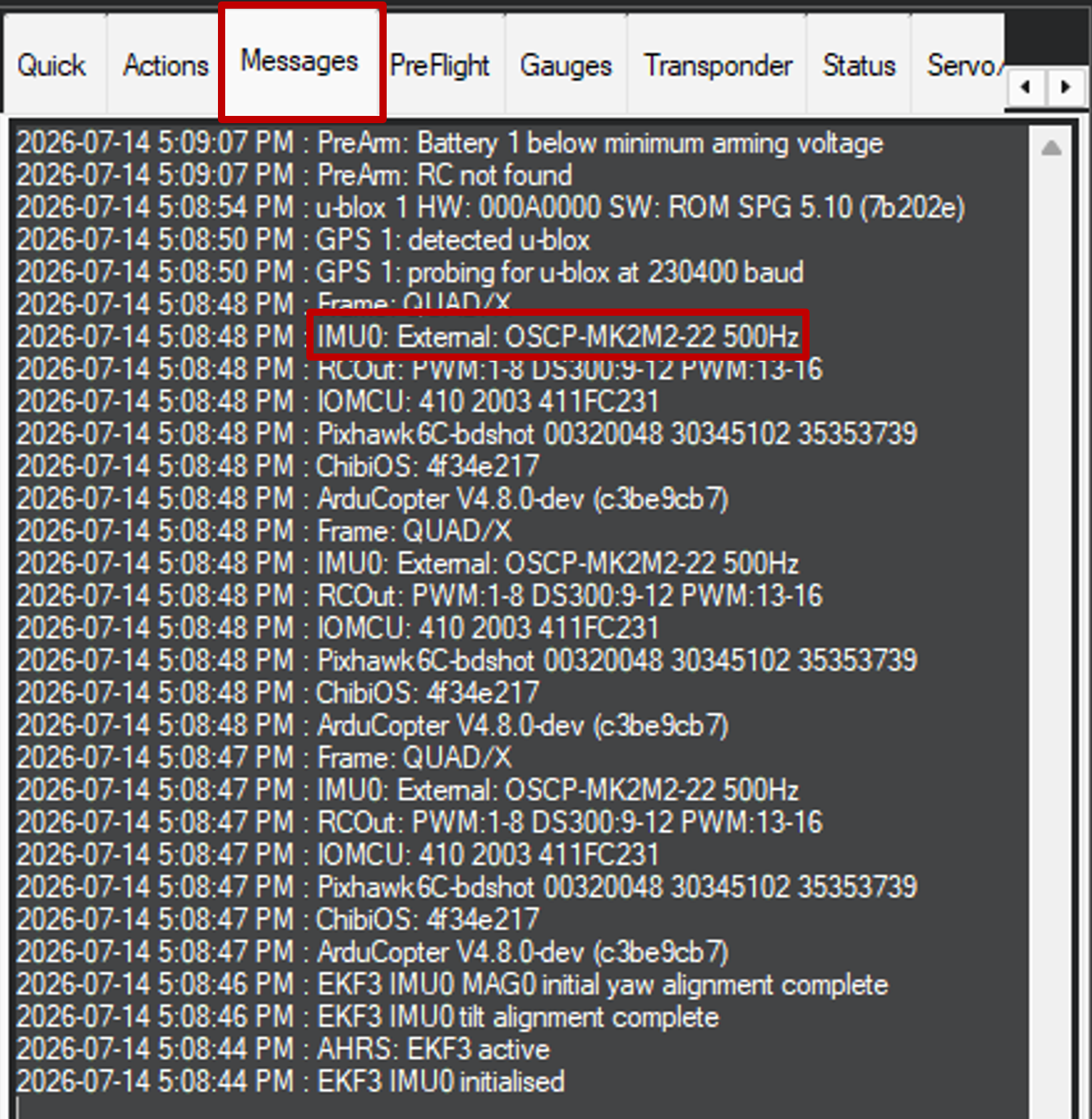
Successful Installation
The firmware boots successfully and the OSCP External AHRS driver and IMU Product initialize without errors.
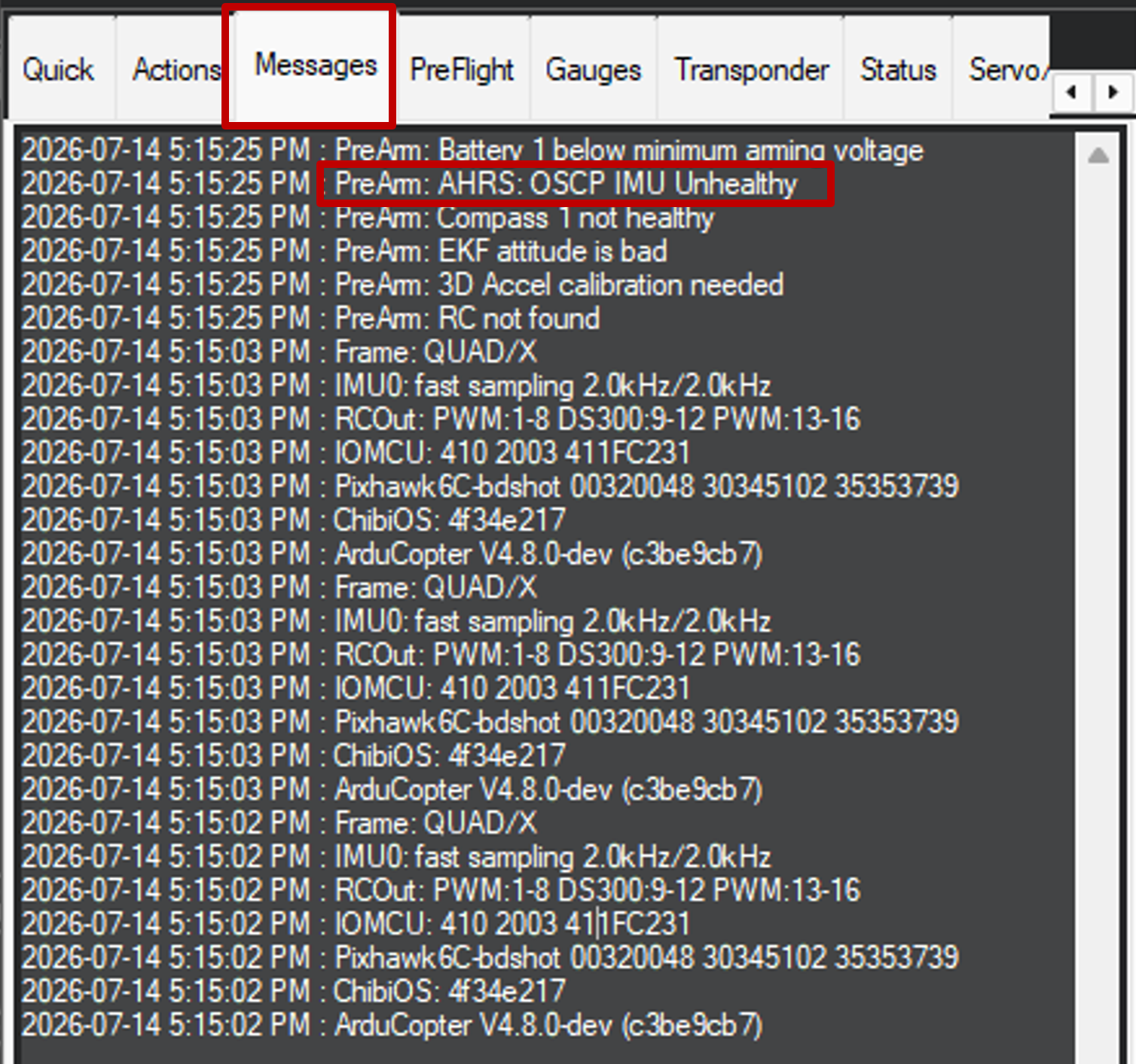
Unsuccessful Installation
Either the flight controller will never connect to Mission Planner, or if it does connect, the OSCP IMU is not detected. This is typically caused by a serial connection issue, the IMU not being powered, incorrect Full Parameter List configurations, or the flight controller not being configured properly in .hwdef.
Configuration Complete
Your OSCP IMU is now configured and ready for operation.
For more OSCP IMU products, visit www.oscp.com/technology.